How Simon works
Working with Simon is mostly about delegating: you tell it what you need, it does the accounting work, and you validate. This page sets out the mental model that ties it all together — what the agent does, how a document progresses, why some cases stop, and how your decisions are remembered.
The chat to delegate, the screen to check
You drive Simon mainly through conversation: you ask the agent to diagnose or carry out a task, and it takes care of it. The graphical interface comes as a support — views, forms, resolution screens — to consult and correct what it has prepared. Since both rely on the same data, an action started in the chat shows up on the screen, and vice versa:
- create a third party from the Third parties view, or ask “create the supplier ACME”;
- unblock a qualification from a form, or via a proposal from the agent;
- prepare a return from the workflow, or by asking “prepare my VAT”.
It’s up to you to choose whatever is most convenient at the moment.
A document’s journey
A document always follows the same path. The technical details exist (see the document lifecycle), but to work, the essential thing is to know where a document is and what it’s missing to move forward.
flowchart LR A["Import"] --> B["Qualification"] B --> C["Reconciliation"] C --> D["Posting"] D --> E["Lettering"]At import, you add a document or a statement; Simon reads the document, identifies its type and extracts the useful information from it. Then comes qualification, where it applies the tax rules and your habits to set the category, the professional share, the recoverable VAT and the deduction method. The document is then reconciled with a bank transaction or another payment method, then posted: the journal entry is generated from the qualified and reconciled document. Lettering, finally, links the open lines to track paid invoices and remaining balances.
This journey chains automatically as soon as the prerequisites of a step are met. If a decision is missing, Simon stops at the right place and explains why rather than guessing.
The workflow: the living checklist
The workflow is Simon’s common thread. After each action, it re-evaluates the documents, transactions, periods and obligations concerned, and recomposes a work plan: what is ready, what needs watching, what is blocking.
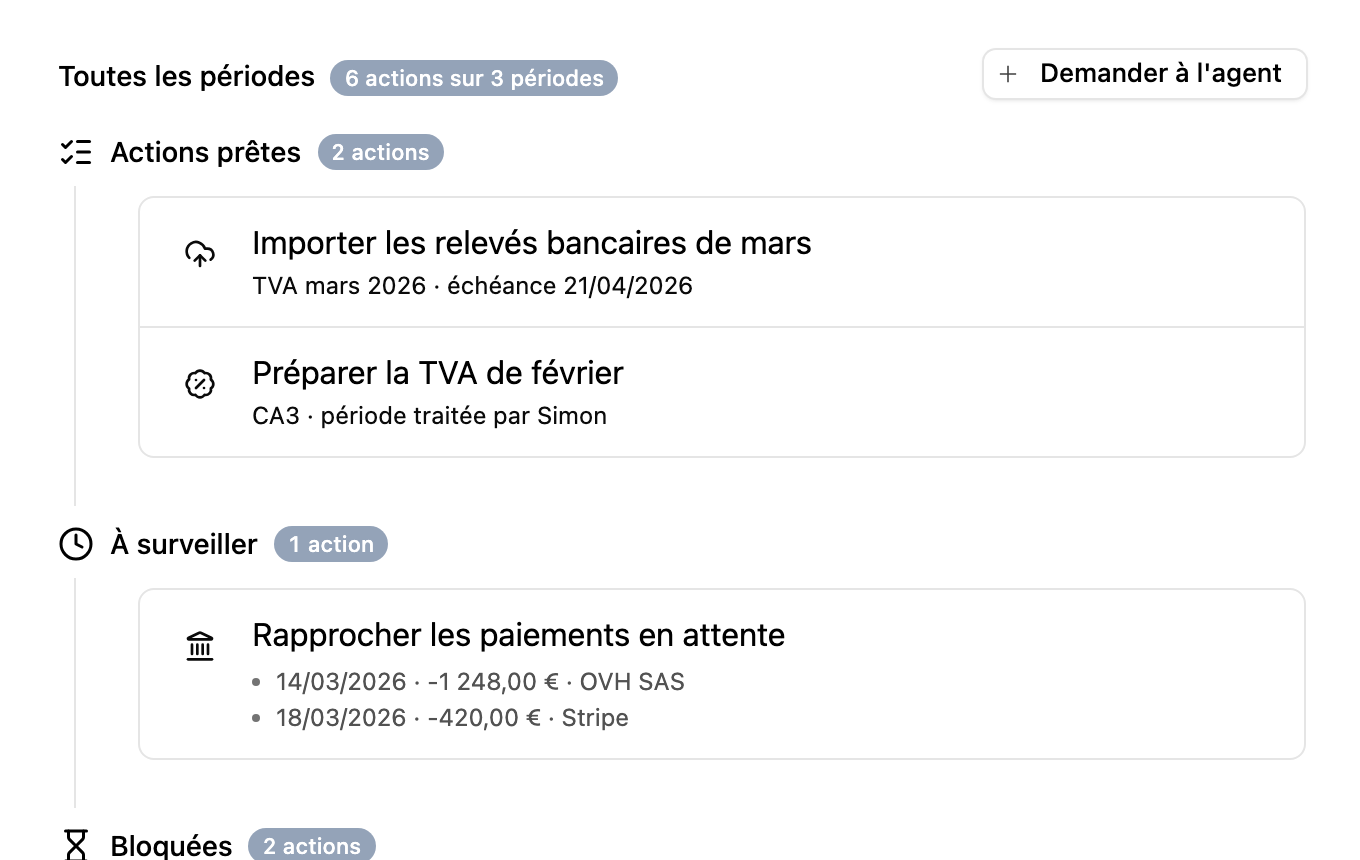
Its value is to never handle an action in isolation: a qualification can unblock a reconciliation, a reconciliation a posting, and a posting can make a declarative period ready. It is also the agent’s first reflex — it consults the workflow before answering the question “what’s left for me to do?”.
Why Simon sometimes stops
Not all blocks are equal. Simon distinguishes between what genuinely prevents moving forward and what merely deserves a confirmation.
A hard block forbids continuing until the data is corrected: inconsistent amounts, an active bank account without an IBAN, a document in foreign currency without a conversion rate, a locked period. The data is simply unusable as it stands.
A soft block is a warning: the action can move forward if you confirm knowingly. This is the case for a probable duplicate, non-recoverable or partially deductible VAT, an unusual amount for a supplier, or an incomplete supporting document. The override is tracked.
In both cases, the agent must explain what is to be decided and why. When the decision is structured, the interface can display a dedicated form rather than a free-text answer.
Learning
Simon remembers recurring decisions in the form of patterns: for a given supplier, a category, a professional share, a VAT treatment, a type of expense.
The first time a case comes up, it often asks for confirmation. The following times, it can propose the same treatment automatically — and each qualification keeps its source: tax rule, learned pattern, or manual decision. This learning does not replace control: it silences repetitive questions and makes your past choices visible.
A few typical requests
”Prepare my VAT return for the last quarter, but check the prerequisites first.”
Simon starts by consulting the period’s workflow. If documents, reconciliations or journal entries are missing, it tells you before going further. Once the prerequisites are met, it prepares the return, presents the amounts and waits for your validation to mark it ready. It prepares — it does not file electronically.
”Make me a six-month cash flow projection with a salary of €3,500 per month.”
Simon reads the bank balance, the customer invoices to be collected, the supplier debts, the tax due dates and the known commitments, then projects the cash flow and flags the months at risk. This is not automatic payroll, but a decision aid based on the available data.
”This telecom expense is for mixed use, how should it be treated?”
Simon loads the qualification context, finds the applicable rules and explains the proposed treatment: professional share, recoverable VAT, justification. If the question goes beyond the local rules, it can consult the documentary base dedicated to tax and accounting sources.
”Create a view that lists third parties with their customer or supplier role.”
Simon inspects the necessary data, composes an MDX view and saves it in your workspace, where it becomes consultable like any other screen.
”I have a FEC to import for my accounting migration.”
Simon declares the import, analyzes the file, maps the journals, accounts and third parties, runs the import then checks consistency. If documents or fixed assets are included, it attaches them along the way.